
Architecture practice OS

Studio Ledger

The operating system for architecture studios.

Projects, drawings, people, standards, time and finance in one workspace, with every drawing reviewed by AI against your studio’s own standards.

Scroll to build your studio

01 / 04 · Projects and tasks

The struggle

The work is scattered across WhatsApp, Excel, email and the shared drive.

How Studio Ledger solves it

Projects, tasks and deadlines live in one ledger. Everyone can see what’s due, who has it and where each sheet is in review.
02 / 04 · Drawing review

The struggle

Every sheet is still checked by eye, usually the principal’s, the night before an issue.

How Studio Ledger solves it

Every drawing is checked against your standards the moment it’s submitted, and AI marks exactly where the problems are.

03 / 04 · Studio standards

The struggle

Your drawing standards live in one person’s head, and leave with them.

How Studio Ledger solves it

Write them once: title blocks, scales, line weights, naming and principles. Every sheet is held to them, and juniors see which ones they miss.

04 / 04 · People and fees

The struggle

You find out someone is overloaded when they resign, and invoices go out weeks late.

How Studio Ledger solves it

See who’s in, who’s stretched and who needs mentoring, and know the day a phase is ready to invoice.

01A-101The workspace

Your whole studio.
On one screen.

01 / Master controlX 0.00 · Y 0.00Grid 40Status / live
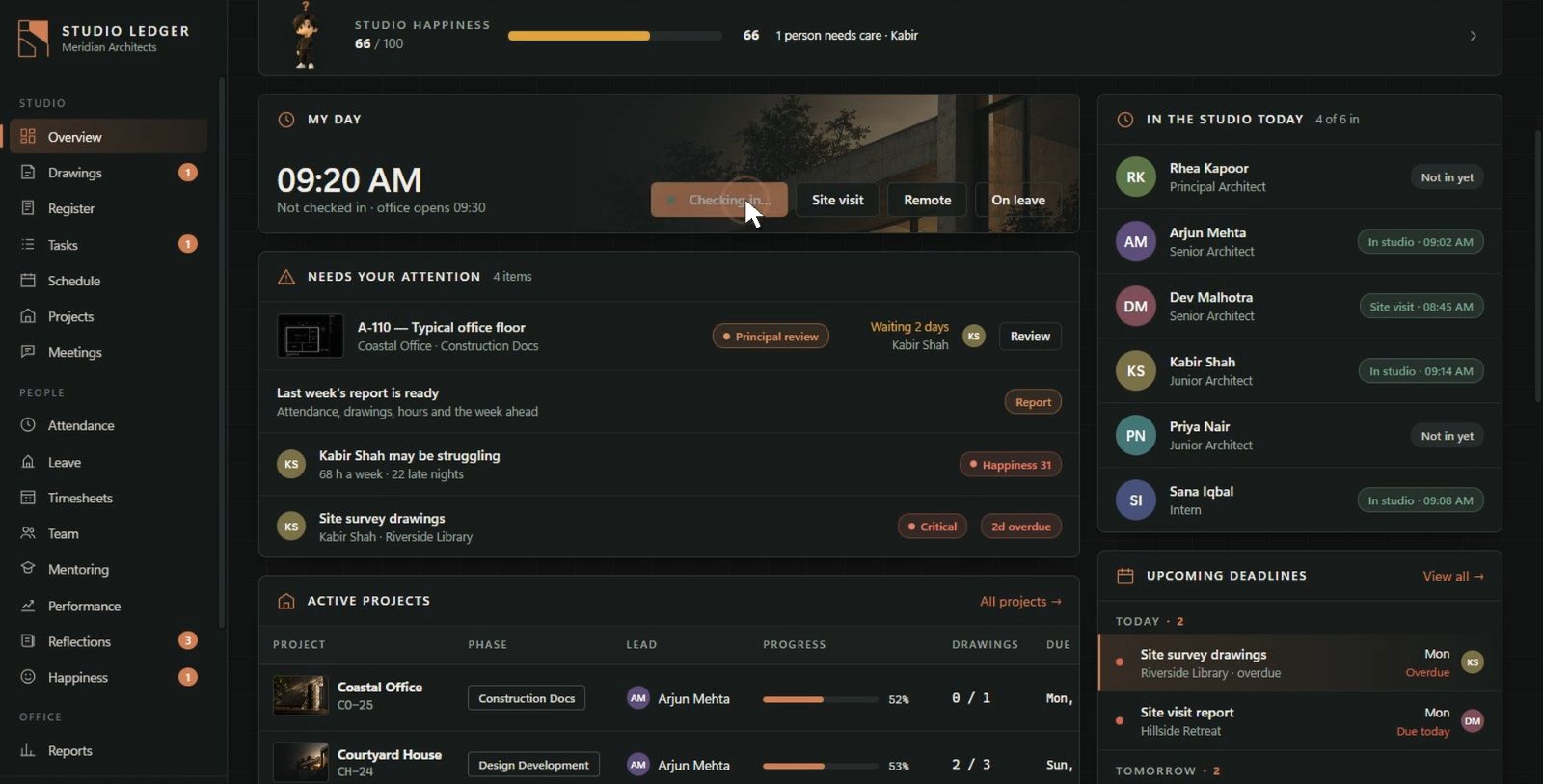
Monday, 5 October · Principal architectStudio overview
Active projects62 in construction docs
Drawings14238 approved this month
Open tasks183 due this week
First-pass rate87%▲ 6 pts vs last month
Drawing registerCH-24 · Courtyard House
SheetTitleRevStatus
A-104First floor plan04Needs review
A-105Roof plan02Approved
A-203Section B–B01In review
A-301South elevation03Approved
Projects6 active
  • Courtyard House53%
  • Coastal Office52%
  • Riverside Library71%
  • Hillside Retreat60%
02A-201The system

One ledger.
Everything connected.

SL-00Studio Ledger
03A-301AI drawing review

Your drawings.
Understood.

Studio Ledger reads every sheet against your firm's own standards and marks exactly where the problems are, before a senior architect, a consultant or a site ever sees it.

A-104 · First floor plan1:100 @ A1Ready
ABCD 123 6 0005 4004 500 D-01 D-02 D-04 LIVING01 · 26.4 m² KITCHEN02 · 18.2 m² BED03 · 14.8 m² DINING04 · 19.6 m² STUDIO05 · 12.1 m² S02 N 1A-104FIRST FLOOR PLANSCALE 1:100 PROJECTCH-24 SHEETA-104 SCALE1:100 REV04 DRAWNPN CHECKED— 01 · Checked by missing 02 · Door tag missing 03 · No UP arrow / risers
A-104 / First floor plan / Rev 04 Analysis / Standards v3.4

Standards

  • Sheet number
  • Project code
  • Drawing title
  • Scale
  • Revision
  • Checked by

Architectural check

  • Dimensions
  • Door tags
  • Room names
  • Stair annotation
Drawing score

0/ 100

3 issues require attention

Read from the file

Sheet number, file name, scale, paper size and title-block text are checked the moment a PDF is submitted.

Judged by AI

Claude reviews the drawing itself against the standards you write, and says where on the sheet each problem is.

Decided by people

A failed MUST rule returns the sheet with a fix list. Seniors and the principal still have the final say on every sheet.

AI review runs on your studio's own Anthropic key, so you pay Anthropic directly per check, with a monthly budget you set. Without internet, sheets fall back to the automatic checks.

04A-401Purpose-built

Built for architecture.
Not adapted to it.

Generic softwareStudio Ledger
Generic tasksProject-linked tasksEvery task sits in its project, next to its drawings and deadlines
Generic filesDrawing registerSheets, revisions, issues and transmittals per project
Generic checklistsStudio standardsYour title blocks, scales, line weights and principles
Generic time trackingProject profitabilityHours × rates against fee stages, per project
Generic AIAI drawing reviewReads the sheet, not just the text about it
05A-501How it works

See how a project moves
through Studio Ledger.

Create the project

Set the phase, lead architect, team and fee stages. Everything that follows, from sheets and tasks to hours and invoices, is filed against it.

New projectCH-24 · Courtyard House
Client
Mehra Family Trust
Phase
Design development
Lead
Arjun Mehta
Team
Priya Nair · Kabir Shah · Sana Iqbal
Fee
₹18,00,000 · 5 stages

Add a drawing

Upload the PDF. Paper size, sheet number, scale and title block are read straight from the file and filed in the register.

Submit a drawingCH-24_A-104_R04.pdf
  • Paper size A1
  • Sheet number A-104
  • Scale 1:100
  • Revision 04
  • Project code CH-24

Assign an architect

Hand the work to someone with a due date and priority. They see it on their day, and the studio sees its progress.

TaskComplete A-104 for review
Assigned to
Priya Nair · Junior architect
Due
Wed 14 Oct
Priority
High
Progress
70%

AI review

The sheet is checked against your standards. Issues are marked on the drawing, and a failed MUST rule sends it back with a fix list.

AI drawing reviewA-104 · Score 87 / 100
  • Title block, scale, revision
  • Dimensions and room names
  • Checked by missing
  • Door tag missing · D-03
  • Stair annotation

Approval

The senior architect marks each check and redlines the sheet; the principal approves. Every step stays in the sheet's history.

A-104 · Rev 05Approved
  1. Standards
  2. Senior review
  3. Principal
  4. Approved

Approved by Rhea Kapoor · 5 Oct, 11:42 · issued to consultant with transmittal T-031

Project reporting

Weekly and monthly reports pull it all together: drawings, first-pass rate, hours, costs and fees ready to invoice.

Monthly report · OctoberCourtyard House
12drawings approved
87%first-pass rate
164 hlogged
₹4.2Lready to invoice
06A-601For the entire practice

Every handoff.
Visible and accountable.

From the principal setting standards to a sheet being issued, everyone can see where a drawing is, who has it and what it's waiting for.

  1. Principalsets the studio standards
  2. Project architectassigns the drawing
  3. Junior architectsubmits the sheet
  4. AI reviewchecks it against the standards
  5. Project architectreviews and redlines
  6. Principalapproves
  7. Issuedlogged in the register with a transmittal
07A-701Inside the product

The actual application.
Not a mockup.

A-01DashboardScale 1:1Live workspace
08A-801Your data

Your folder.
Your drawings. Your records.

Local studio data

PC 01PC 02PC 03PC 04
Studio folderYour server, NAS or synced drive
+ Optional AI connectionAI reviewOnly for the reviews you run

No cloud account

Everything is kept in a shared studio folder on your own server, NAS or synced drive. Drawings leave the office only for the AI reviews you choose to run.

Works offline

Check-ins, tasks, reviews and approvals all work without internet. AI features return when you're back online.

Nothing is deleted

If a plan lapses you get 14 days to renew with everything working. After that the studio is read-only, and every record stays viewable.

One licence, every PC

The principal pastes one licence key and every PC on the studio folder picks it up. Nothing to reinstall when you grow.

09A-901Pricing

A plan for every practice.

Enterprise40+ people, multiple offices, custom terms and onboarding. API and single sign-on are on the way.
Talk to us

Prices in rupees, plus GST. Every new studio starts with a 30-day trial of everything, no card needed. Unlimited AI reviews run on your studio's own Anthropic key.

Limited offerEnds 31 Dec 2026

Refer a firm.
Get a month free.

Every studio has a referral code in Settings → Plan & billing. When a practice you refer joins on a paid plan, you both get time added to your licence.

You get1 monthextra on the plan you're on
They get15 daysextra on their first paid plan

Counts once the referred firm has paid for Studio, Practice, Firm or Enterprise; trials and Solo don't qualify. For firms new to Studio Ledger. If you aren't on a paid plan yet, your month is kept until you buy. Referrals must be paid for by 31 December 2026.

10A-001Questions

Questions studios ask.

Does it need internet or a server?

No special server. Studio Ledger keeps everything in a shared folder: a NAS, a shared drive on one PC, or a synced drive all work. It works offline; only AI reviews and Ask Claude need internet.

What do I need for AI drawing review?

An Anthropic API key from console.anthropic.com, which the principal adds in Settings. You pay Anthropic directly for each check and set a monthly budget in Studio Ledger. A Claude Pro or Max chat subscription can't be used by other apps. Solo includes 10 AI checks a month; paid plans have no cap.

Which file types can be checked?

PDF. Export your sheets from AutoCAD, Revit, ArchiCAD or SketchUp Layout as PDF, as you would for issue. Paper size, sheet number, scale and title-block text are read straight from it.

What happens when the trial ends?

Choose a plan and paste the licence key. If you don't, Studio Ledger moves to the free Solo plan; a studio with more people or projects than Solo allows becomes read-only. Nothing is deleted, and a licence key unlocks everything again.

Do I pay per person?

No. Each plan includes a number of people (5, 15 or 30), with a lower price for every extra person on larger plans.

Does it work on Mac?

Not yet. Studio Ledger runs on Windows 10 and 11.

Ready when you are

Run your studio like a practice.
Not a spreadsheet.

  1. 01Install on each PC and point it at a shared studio folder
  2. 02Add your projects, team and drawing standards
  3. 03After 30 days, email your Studio ID for a licence key

Version · Windows 10 & 11 · 64-bit

Product tour · 6 minutes · six people, one studio